Buildern vs. JobTread Reviews 2026: Features, Pricing, and Best Choice for Contractors


Buildern vs. JobTread is a common comparison among builders exploring efficient ways to manage estimating, job tracking, finances, and team coordination.
The right software doesn’t just improve daily operations, but supports long-term growth. If you’re evaluating options, these two names likely top your list.
Both platforms aim to simplify construction project management for builders and contractors. However, the depth of their offerings, flexibility, and long-term value are not equal.
In this comparison, we break down Buildern vs. JobTread across critical areas like features, ease of use, scalability, pricing, and overall user experience, so you can confidently choose the right platform for your company’s future.

Table of Contents
- Buildern vs. Jobtread: Quick Snapshot
- Estimating and Preconstruction: How Builders Compare Buildern & JobTread
- Project Management and Field Collaboration in Buildern & JobTread
- Buildern vs. JobTread Reviews: Financial Tools & Accounting Integrations
- Ease of Use: Buildern vs. JobTread Onboarding and Learning Curve
- Buildern vs. JobTread Pricing: What to Expect
- Buildern vs. JobTread Reviews: What Real Users Are Saying
- Product Evolution & User-Centered Innovation
- Final Verdict: Buildern or JobTread?
Buildern vs. JobTread: Quick Snapshot
Before we dive deep into specific features, here is a quick overview of what you can expect from each platform:
➡️ Buildern is an all-in-one construction management software developed by construction professionals who know the real challenges of the field. It seamlessly connects office and field teams from preconstruction through closeout, integrating powerful financial tools and mobile-first access.
➡️ JobTread, in contrast, is built as a lightweight project management solution targeting smaller contractors. It emphasizes budgeting, proposals, and basic project tracking, making it an approachable starting point for teams transitioning from manual processes.
While both platforms offer value, the difference lies in how well they scale, how comprehensively they manage a project’s full lifecycle, and how much flexibility they give growing teams.
| Feature | Buildern | JobTread |
| Focus | Full lifecycle project and financial management | Budgeting and basic tracking |
| Best for | Growing residential and commercial builders | Small contractors and remodelers |
| Financial Tools | Advanced budgeting, billing, and AI-driven invoicing | Basic budgeting and invoicing |
| Features /Customization | Highly customizable with flexible modules and workflows | Limited customization options |
| Mobile Access | Full-featured native mobile app with notifications | Progressive web app (not in the app store) with limited functionality |
| Integrations | QuickBooks, Xero (more coming) | QuickBooks |
| Scalability | Built to grow with your business | Suitable for small operations |
| Learning Curve | Intuitive UI, short onboarding | Simple setup for basic needs |
Estimating and Preconstruction: How Builders Compare Buildern & JobTread
Accurate estimating is the foundation of every successful construction project. Buildern understands the reality, offering a flexible and robust estimating system that integrates directly with project management workflows.
👉 Every feature in Buildern is thoughtfully designed, with dedicated fields, modules, and smart connections to other parts of the platform, ensuring that data flows seamlessly between estimating, budgeting, billing, scheduling, and more.
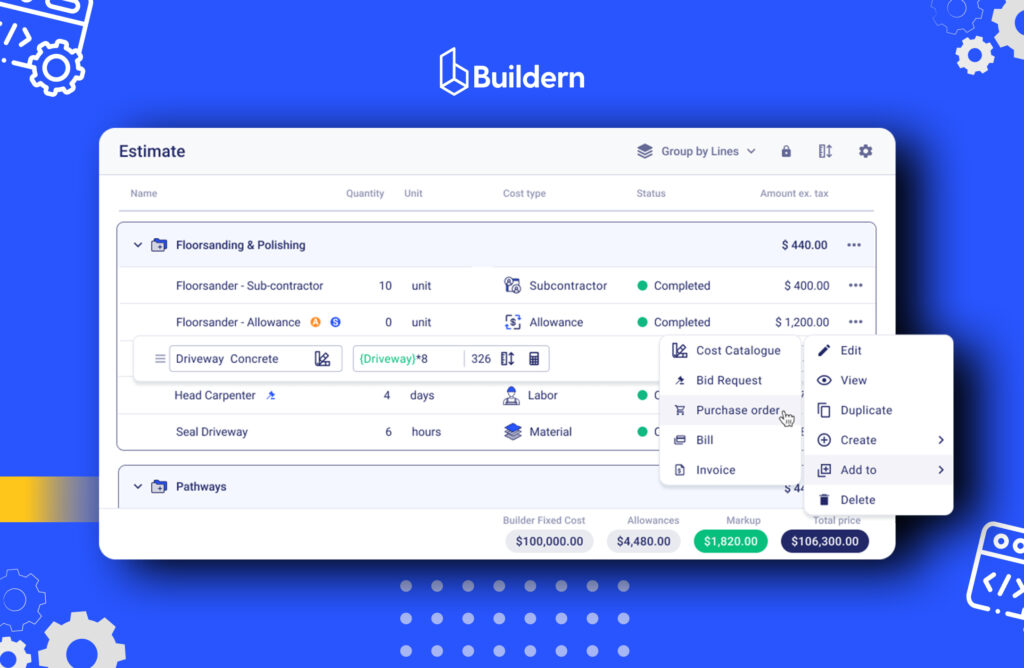
Estimates can be generated from digital takeoffs or built using customizable cost catalogs. Overheads, contingencies, and markups are calculated automatically, reducing the risk of missed costs.
Proposals, Purchase Orders, and Client Invoices are linked directly to the Estimate, which ensures consistency and eliminates duplicate data entry as a project progresses.
Recommended reading:
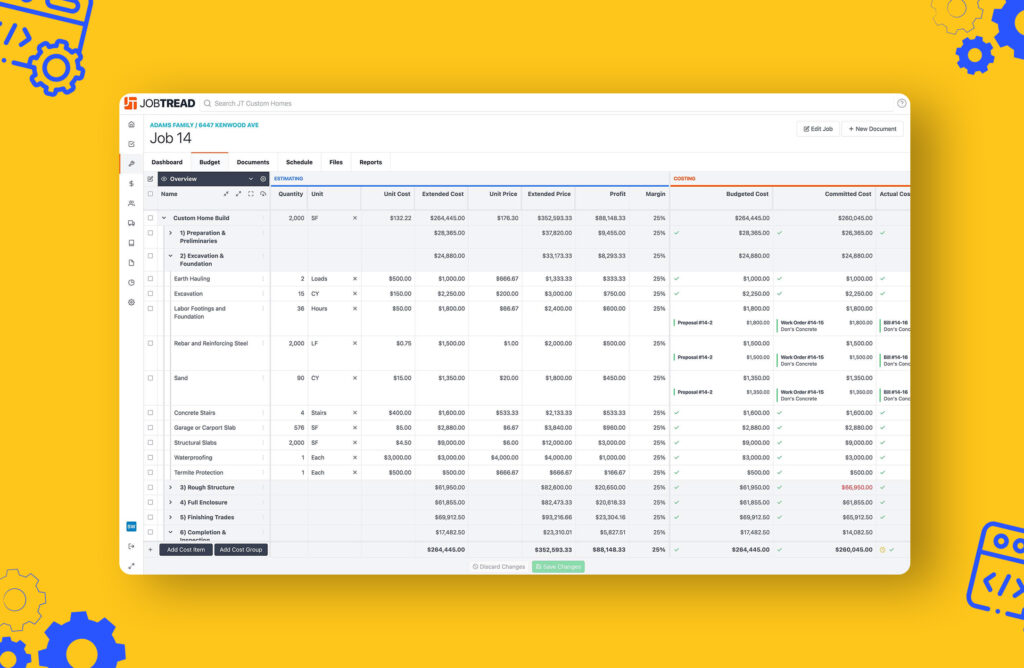
JobTread also offers estimating and proposal-building capabilities. Users can create budgets and client-facing documents quickly. However, the system is primarily spreadsheet-based as most functions rely on Excel-like tables and document templates.
To create a specific item like a PO or Invoice, users have to go through a manual process, such as creating a document → choosing a document type → building a document, without a unified module-based view. As a result, it’s difficult to get a clear overview of all bills, POs, or COs in one place.
For simple residential projects, this structure may be sufficient. But for custom builds, remodels, or commercial projects that demand detail, automation, and connected workflows, Buildern offers a far more powerful and efficient solution.
Project Management and Field Collaboration in Buildern & JobTread
Managing active construction projects demands clear visibility, fast communication, and complete coordination between the office and the field.
➡️ Buildern provides an integrated environment where teams can build full project schedules, assign tasks with deadlines and dependencies, track daily activities with logs and photos, manage RFIs, and maintain version-controlled documents. All of this is accessible both on desktop and through a highly optimized mobile app.
👉 In addition, Buildern includes features like digital takeoffs, bid requests that can be sent to multiple subs/vendors for pricing, AI billing, and customizable dashboards, giving teams a single place to manage and monitor every aspect of the project.
Creating POs, Invoices, Proposals, and other documents is streamlined with built-in modules with no need for repetitive steps or disconnected tools.
Selections and allowances are also tracked in a centralized, intuitive interface and ensure clients and teams’ alignment.
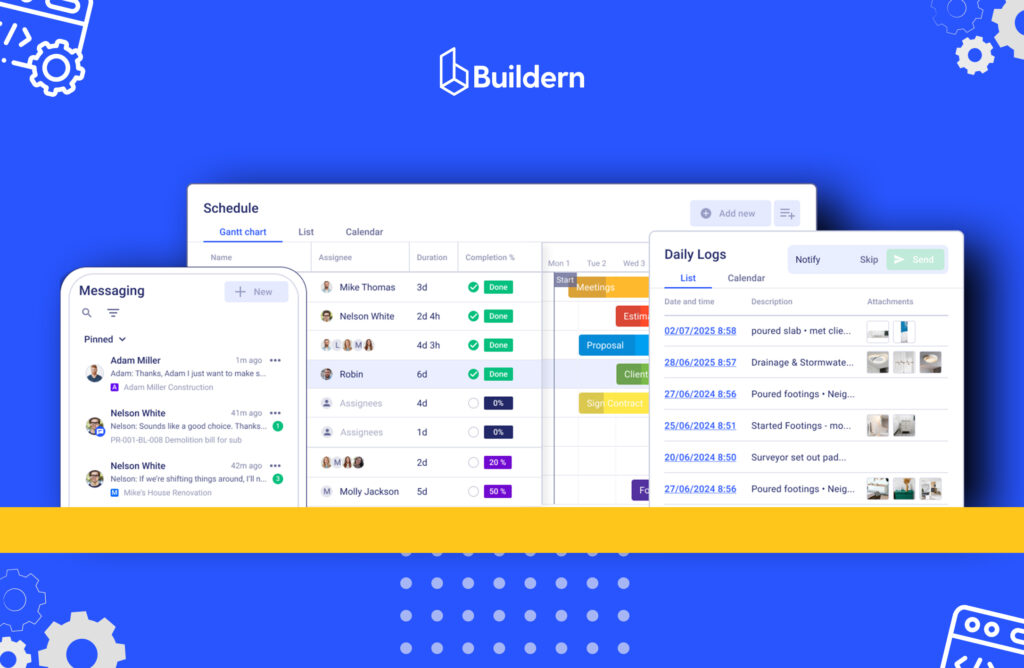
The mobile-first design is critical. Field workers can update logs, upload progress photos, submit RFIs, and review the latest schedules without returning to the office. This real-time access helps eliminate miscommunication, accelerates decision-making, and keeps projects on track.
Recommended reading:
➡️ JobTread includes task lists, file attachments, and client communication features, but its field collaboration tools are more limited. While a mobile-responsive version of the platform is available, full mobile project management capabilities are not as developed.
Most tools are document-driven, requiring several steps: e.g., create → select document type → customize for each action. There’s no centralized view for Bills, POs, or Selections, and tracking allowances can be difficult.
As project complexity increases, this limitation can introduce friction between field operations and office oversight.
Buildern vs. JobTread: Financial Tools & Accounting Integrations
Financial visibility and control are just as important as schedule management in construction. Poor billing practices, inaccurate forecasting, and weak change order controls can erode profitability.
👉 Buildern integrates strong financial management tools directly into its workflows. Contractors can track budget vs. actuals in real time, generate invoices, manage change orders through structured approvals, and sync financial data seamlessly with QuickBooks and Xero.
Payment schedules, retainage tracking, and milestone-based structures are built into the system to match real-world construction workflows.
👉 JobTread offers basic budgeting and invoicing features, allowing users to create project budgets and client invoices. It syncs with QuickBooks for accounting purposes. However, it does not offer features like WIP reporting, integrated cash flow projections, or customizable billing schedules tied to project milestones.
Additionally, it lacks the ability to import historical financial data from QuickBooks, limiting visibility into past project performance.
Ease of Use: Buildern vs. JobTread Onboarding and Learning Curve
Ease of use can make or break software adoption. A platform must balance power with simplicity so teams actually use the tools available.
➡️ Buildern offers a clean, intuitive interface designed to minimize the learning curve. Most teams can complete onboarding within a few hours, and the software is easy for field workers, project managers, and administrators alike.
Support from Buildern’s product teams is fast and hands-on, including walkthroughs, best-practice advice, and regular feature updates and improvements based on real user feedback.

➡️ JobTread is also known for being easy to learn, particularly for small teams new to construction software. Its simplified feature set makes it accessible to users without prior project management experience.
However, the same simplicity can limit more advanced teams from looking for richer workflows as they grow. Similarly, JobTread reviews indicate that switching from other software can be troublesome as data imports (from Excel, QuickBooks, etc) must be done manually.
In contrast, Buildern offers automated tools to import data from different sources, making adoption and migration faster and smoother.

Buildern & JobTread Pricing: What to Expect
Buildern follows a simple, transparent pricing model with no hidden fees. Every subscription includes full access to essential project management, financial, and collaboration tools.
Teams can scale without hidden fees; Buildern doesn’t charge for field workers, subcontractors, vendors, or clients. While core users are billed, you can still add unlimited projects and external collaborators at no additional cost.
In contrast, JobTread pricing starts with a single-user plan, meaning the base subscription includes only one user, not two. As your team grows and you add additional office or field users, the monthly cost increases accordingly.
For contractors evaluating long-term software costs, it’s important to consider how additional user fees may impact overall scalability.
When it comes to scalability, Buildern is designed to support growing construction companies without forcing costly system migrations later.
Teams starting with small residential projects can confidently expand into larger custom homes, commercial work, or multi-project operations with the same core platform.
Buildern vs. JobTread Pricing Comparison
| Feature | Buildern | JobTread |
| Free Trial | 7-day free trial | No free trial (30-day money-back) |
| Pricing Plans | Starter – $250/month (includes 2 paid seats ) Pro – $400/month (includes 4 paid seats, field workers free) | Monthly Plan – $199/month (includes 1 user) |
| Next Plan (sample calculation: 4 admin users + 6 field workers) | ~$400/month (admin users only; field workers are free) | ~$540/month |
| Enterprise Plan | ✅ Custom pricing for 30+ users, 24/7 support, custom features | ⛔ Not listed |
| Unlimited Projects | ✅ Included in all plans | ✅ Included |
| Unlimited Clients, Subs, Vendors | ✅ Included; they don’t count as paid users | ✅ Included; no extra charge |
| Client Portal | ✅ Included | ✅ Included |
| Mobile App | ✅ Included | ✅ Included |
| Integrations | QuickBooks, Xero, Open API, Zapier (more coming) | QuickBooks Online, Gusto, Zapier, EagleView, CompanyCam |
| Custom Feature Development | ✅ Enterprise only | ⛔ Not offered |
| Training & Setup Fees | ✅ Free onboarding and training | ⛔ Offered via third-party partners at additional cost |
| Best For | ✅ For growing residential & commercial teams needing advanced functionality and customization | Small to midsize businesses |
Buildern and JobTread Reviews: What Real Users Are Saying
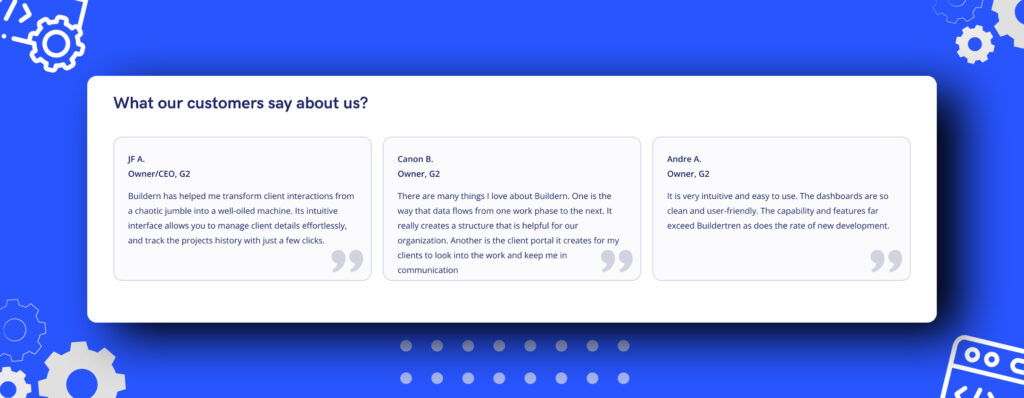
👉 Buildern’s growing reputation is backed by consistently positive reviews from construction professionals across various sectors.
Users frequently highlight the platform’s flexibility, depth, and user-friendliness. Many builders note significant improvements in communication, budget control, and project delivery timelines after adopting Buildern.
“What we like most about Buildern is how it combines capability with simplicity. The platform has all the core functions you’d expect from a high-end construction management software—budget tracking, change orders, subcontractor coordination, progress documentation, and communication tools—but it’s laid out in a way that’s intuitive and easy for our team to adopt. It allows our smaller team to operate like a much larger one without getting bogged down in unnecessary complexity. The interface is clean, the support team is responsive, and implementation was smooth.” Brent B., Capterra
👉 JobTread enjoys positive feedback from smaller contractors who value its affordability and simplicity. However, several users mention that as their businesses grew, they encountered feature limitations, especially around field collaboration, financial reporting, and custom workflows.
“The scheduling feature is no nibel enough. It is not easy to define working and non working days, we couldn’t prknt a specific number of days or durations, we could build a resource schedule which is linked to the activity schedule,” Ashenafi B., Capterra
Product Evolution & User-Centered Innovation
One of Buildern’s biggest advantages lies in how quickly the platform develops, and how closely that development is shaped by real-world construction teams.
Buildern works directly with construction professionals to understand their challenges and translate them into practical, high-impact features.
Buildern releases major updates every week, continuously improving functionality based on user feedback. From UI enhancements to entirely new modules, the development pace ensures builders aren’t stuck waiting months (or years) for the tools they need.
In contrast, JobTread’s update cycle is slower and more controlled, which might make it harder for users to influence the roadmap or see meaningful changes rolled out quickly. For teams looking to grow with a product that listens, adapts, and evolves with them, Buildern is the partner, not just a platform.
Final Verdict
Both Buildern and JobTread offer strong alternatives to spreadsheets and manual project management. For small contractors handling basic residential projects, JobTread may offer a lightweight starting point, but its limitations quickly become apparent as project complexity and team size grow.
Buildern, on the other hand, is designed to scale with your business, offering robust features, integrated workflows, and automation that support growing residential and commercial operations from day one.
Choose Buildern if you:
- Manage multiple projects
- Need financial depth and client transparency
- Want scalability
Choose JobTread if you:
- Are a small contractor
- Need simple budgeting
- Just moving from spreadsheets
The right choice depends on the size, complexity, and ambitions of your construction company.

What is the Difference Between Buildern and JobTread?
Buildern is a full lifecycle construction management platform designed to handle estimating, scheduling, field collaboration, financials, and reporting in a single, connected system. JobTread focuses on budgeting, proposals, and project tracking, with simpler workflows and fewer advanced features.
Which Construction Project Management Software is Better for Small Businesses?
It depends on which features the builder is focused on. However, for small businesses planning to grow, Buildern offers stronger estimating, financial tools, and scalability, making it a better long-term solution.
Do JobTread and Buildern Integrate with QuickBooks and Xero?
Both platforms integrate with QuickBooks for accounting sync. Buildern also offers integration with Xero, providing more flexibility for contractors who use an accounting software popular among customers in Australia, New Zealand, and the UK.